
A small screen-printing business rarely starts with a perfect shop. It may begin with a folding table, a flash dryer, and a stack of shirts waiting beside the press. The right Screen Printing Machine can make that setup more consistent, but “best” depends on the work: print volume, available space, color count, and operator experience. A four-color manual press may suit a startup producing short runs. A growing shop might need more stations, faster setup, or a reliable way to repeat jobs.
Printing-industry consultant Marshall Atkinson emphasizes production workflow in his guidance. A practical way to express that principle is: “Choose equipment that makes quality prints repeatable, not merely equipment with the lowest price.” That distinction matters. A low-cost press can become frustrating if its platens shift or registration takes too long. Still, a feature-rich machine is not automatically the smart choice. It can take up valuable floor space and add costs before orders justify them.
This guide compares ten machines with small-business needs in mind, including setup, capacity, usability, and room to grow. Look closely at the details: how easily screens align, whether the controls feel clear, and how much space the machine needs beside a dryer. Small differences show up on busy days. No machine removes every learning curve. That is worth admitting. A careful match between equipment and real production goals can help new owners spend wisely, print more consistently, and avoid buying capacity they may not use.
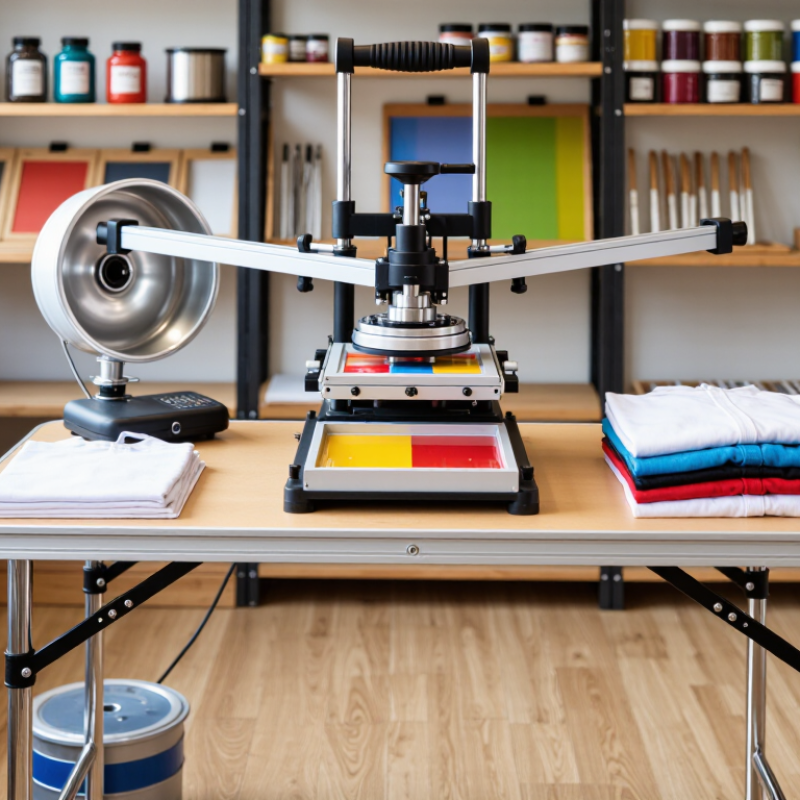
A screen printing machine presses ink through a stretched mesh screen onto fabric or another surface. Its main parts work together: the frame holds the mesh taut, the screen carries the design, and the squeegee pushes ink through open areas. A platen supports the shirt beneath the screen. On a manual press, the operator moves the screen and squeegee by hand. Automatic presses handle repeated motions, but still need careful setup.
The setup matters. Mesh count affects how much ink passes through, while screen tension helps keep fine details sharp. A loose screen can blur edges; uneven pressure may leave pale patches. The flash dryer briefly gels ink between colors, and a conveyor dryer cures the print with controlled heat. Check temperature with a probe, not just a quick touch. It is easy to misjudge a garment’s surface.
Grand View Research’s screen-printing market report estimates the global market at USD 3.9 billion in 2023 and projects 5.1% annual growth through 2030. That figure covers a broad industry, not small-business machine sales alone. For a shop, the useful question is practical: can the press hold registration across repeated prints? A test print reveals more than a spec sheet. It may still expose flaws.
For a small shop, the right screen printing machine is the one that fits real order volume, not an optimistic sales forecast. Estimate how many shirts you can print during a normal week, then consider busy seasons. A manual press may suit short runs and limited floor space. Larger orders can make a multi-station setup more practical, but it also needs room to move screens, garments, and finished prints. Measure the work area before buying. Leave space for drying and safe movement, too.
Check that the press holds screens firmly and allows repeatable registration. Even a small shift can turn fine lettering into a blurry edge. Platen size matters: the largest design you expect to print should fit without awkward garment positioning. Consider setup time, adjustment tools, and whether replacement parts are easy to obtain. Ask how the machine works with your curing equipment; a clean print still needs proper curing. It is easy to focus on the purchase price and overlook installation, maintenance, and training costs. That can hurt.
For a first machine, simple controls and accessible adjustments may be more valuable than extra features. Watch a demonstration if possible, and test a sample garment with the screen and ink you plan to use. Note how long setup takes and whether the print stays aligned through several impressions. A compact machine may save space but limit future jobs. There is no perfect choice. Revisit your assumptions after a few real orders.
Ten screen-printing machines suited to small businesses should be judged by daily workload, available floor space, and setup time—not color count alone.
Grand View Research estimated the global screen-printing market at about USD 3.9 billion in 2023, with projected annual growth of 3.9% from 2024 to 2030.
That market estimate signals ongoing demand, but it does not mean every small shop needs automation. Space matters. A practical shortlist could include a one-color tabletop press, four-color tabletop press, four-color floor press, six-color manual press, micro-registration press, compact rotary press, pneumatic-assisted press, entry-level automatic press, small-format automatic press, and a manual-to-automatic upgrade configuration.
These options suit different workloads. A tabletop unit can handle short runs, while a floor-mounted manual press offers more stations for varied garments. Micro-registration helps refine alignment when designs use multiple colors. Automatic presses can raise output, but need consistent order volume, maintenance time, and room for screens and curing equipment.
Check platen size, maximum print area, replacement-part access, and operator training before buying. A press that looks efficient in a catalog may feel cramped beside a drying unit. I would also compare setup and cleanup time, not just advertised hourly output; those figures rarely reflect a busy shop’s interruptions.
Grand View Research’s market data provides useful context, not a buying forecast for any individual business.
For a small business, the best screen printing machine depends on order size, available space, and labor. Manual presses usually cost less and suit short runs, custom jobs, and shops still testing demand. Entry-level models may range from a few hundred to several thousand dollars, depending on station count and build quality. They need hands-on operation, so output slows when one person handles loading, printing, and unloading. A tabletop press saves floor space, but its limited capacity can become frustrating as orders grow.
Semi-automatic presses reduce repetitive effort and help maintain more consistent prints across medium-sized runs. They require a larger upfront budget, plus room for a conveyor dryer or other curing setup. Automatic machines can produce much higher volumes, but purchase, installation, maintenance, and power costs add up quickly. Bigger is not always better. A machine rated for fast production may sit idle if weekly orders are small.
Compare practical output, not just advertised speed. Ask how many colors each press supports, how quickly screens can be changed, and whether one operator can run it comfortably. Include screens, inks, cleaning supplies, and curing equipment in the budget. These extras are easy to underestimate. Capacity estimates also depend on artwork, garment handling, and operator experience, so leave room for slower jobs. The cheapest option may cost more later if it limits growth or needs frequent adjustments.
Choosing a screen-printing machine starts with the work you actually sell. Match the press to daily order volume, print size, color count, and available floor space. A manual press can suit short runs and tight budgets; an automatic model may reduce repetitive handling as orders grow. Check frame compatibility, registration adjustments, and access to replacement parts before buying. A fast press is not useful if the dryer cannot keep pace. FESPA’s 2023 Print Census collected responses from more than 1,700 print businesses worldwide, reflecting the varied operational pressures printers face. Treat that broad survey as context, not a substitute for measuring your own workload.
Tips: Run a small test order before committing. Record setup time, misprints, and cure-test results. Clean ink from screens and squeegees after each job, and inspect clamps, bearings, and electrical connections on a set schedule. Use a temperature probe to check the dryer’s actual performance; the display alone may not show what the garment receives. Keep a simple maintenance log. It takes minutes.
Reliable production depends on repeatable setup, not just machine specifications. Keep the press level, verify registration between colors, and test wash samples before shipping. Replace worn parts early, but avoid changing several settings at once; otherwise, troubleshooting gets muddy. Small shops may not need perfect records. Still, skipping them makes recurring defects harder to trace.
By continuing to use the site, you agree to the use of cookies. more information
The cookie settings on this website are set to "allow cookies" to give you the best browsing experience possible. If you continue to use this website without changing your cookie settings or you click "Accept" below then you are consenting to this.