
Blog
What Is a CCTV Security Camera and How Does It Work?
What Is a CCTV Security Camera and How Does It Work? This guide explains the technology behind modern Cctv Security Cameras in practical terms. A CCTV camera captures light through its lens and converts the scene into digital data. That data travels through cables or a secure network connection. An NVR, DVR, or cloud platform then stores and manages the footage. A monitor displays the live view, often from several cameras at once.
Small details matter. A camera above a shop entrance may record faces, delivery boxes, and changing daylight. Infrared LEDs can show movement in darkness, although night images may lose color and fine detail. Motion detection can send an alert when someone crosses a defined area. Power over Ethernet can carry electricity and video through one cable. It is convenient.
Security technologist Bruce Schneier wrote, “Security is a process, not a product.” His observation applies directly to Cctv Security Cameras. Installation, password management, software updates, camera placement, and regular testing all affect real performance. A costly camera cannot correct a blocked lens or poor lighting. That is easy to overlook.
This article also considers privacy-conscious operation, responsible data retention, and dependable maintenance. No camera sees everything. Reflections, weather, blind spots, and network failures can weaken evidence. A practical system needs human review, not blind trust in automated alerts. The technology is useful, but its limits deserve attention.
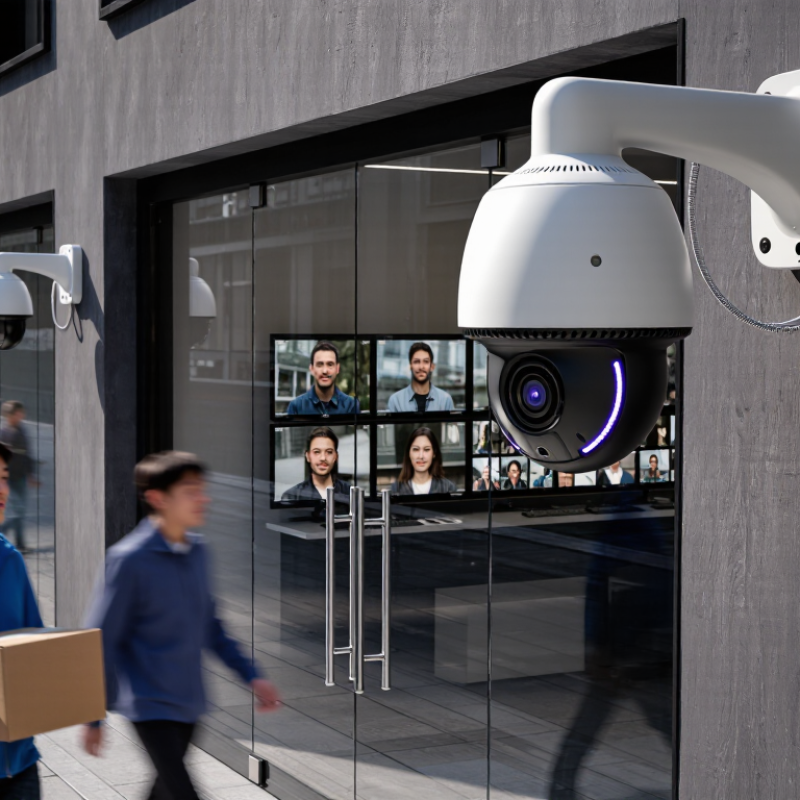
Table of Contents
[Hide]
What Is a CCTV Security Camera?
A CCTV security camera is a device that captures video from a specific area. CCTV means closed-circuit television. Its images usually travel to selected monitors, recorders, or secure networks. Unlike broadcast television, the footage is not intended for public viewing. A typical camera includes a lens, image sensor, housing, and connection system. Some models also use infrared light for darker conditions.
The camera changes incoming light into digital video. That video can be stored continuously or triggered by movement. Staff may review live scenes or search recorded footage by time. In real installations, camera height and lighting matter as much as resolution. A high-resolution camera can still produce poor evidence when glare hides a face. This is easy to overlook. Cameras also have blind spots, and motion detection is not always accurate.
Tips: Check the view during both daytime and nighttime. Keep lenses clean, especially near dusty entrances. Test recorded footage regularly, not only the live display. Place cameras only in appropriate areas, and protect stored video with strong access controls. A simple coverage sketch can reveal missed corners before installation.
What Is a CCTV Security Camera and How Does It Work?
| Data Dimension | Description | Typical Data or Range | How It Affects Operation |
|---|---|---|---|
| Definition | A CCTV security camera is a device that captures video for transmission to a limited set of monitors, recorders, or authorized network users. | Closed or restricted video system | Unlike broadcast television, access to the video feed is controlled by the system owner. |
| Basic Working Process | The lens focuses light onto an image sensor. The camera converts the image into an electrical or digital signal, which is transmitted, displayed, and possibly recorded. | Capture → process → transmit → display or store | Each stage can affect image quality, delay, storage needs, and reliability. |
| Camera Type | Cameras may use a wired video connection or send digital video through an IP network. Some systems combine both approaches. | Analog, HD-over-cable, or IP-based | The camera type determines cabling, network requirements, scalability, and recording equipment. |
| Image Resolution | Resolution describes the number of pixels used to form each video frame. Higher resolution can reveal more detail when lighting and lens quality are sufficient. | Commonly 720p, 1080p, 1440p, or 4K | Higher resolution generally requires more bandwidth and storage capacity. |
| Field of View | The field of view is the visible area captured by the lens. Wide-angle lenses cover more space but may produce greater edge distortion. | Approximately 60° to 120° for many fixed-lens cameras | A wider view reduces blind spots but may make distant subjects appear smaller. |
| Video Transmission | Video can travel through coaxial cable, twisted-pair cable, fiber-optic cable, or a computer network. Wireless models use radio communication. | Wired or wireless; digital network streams commonly use IP | Cable quality, network congestion, distance, and interference can influence connection stability. |
| Power Supply | A camera may receive power through a separate electrical cable, a network cable, a low-voltage adapter, or an internal battery. | Continuous wired power or battery operation | Continuous power supports uninterrupted recording, while batteries require periodic charging or replacement. |
| Night Vision | Many cameras use infrared illumination to produce monochrome video in low-light or dark conditions. | Typical infrared range: about 10–30 m, depending on conditions | Range decreases with fog, rain, obstructions, reflective surfaces, and poor camera placement. |
| Frame Rate | Frame rate is the number of individual images captured per second. Higher rates produce smoother motion. | Commonly 15–30 frames per second | Higher frame rates can improve motion analysis but increase data usage and storage requirements. |
| Video Compression | Compression reduces the amount of data required to transmit and store video by removing redundant information. | Common standards include H.264 and H.265 | More efficient compression can reduce storage and bandwidth use, subject to compatible equipment. |
| Recording Method | Footage may be recorded continuously, when motion is detected, on a local memory card, on a dedicated recorder, or on authorized network storage. | Continuous, scheduled, or event-based recording | Event-based recording saves storage but may miss activity outside configured detection areas. |
| Motion Detection | Motion detection compares changes between video frames or uses additional sensors to identify movement. | Adjustable sensitivity and detection zones | Correct positioning and sensitivity settings help reduce false alerts caused by shadows, weather, or moving vegetation. |
| Storage Capacity | Required storage depends on resolution, frame rate, compression, number of cameras, recording schedule, and retention period. | Measured in gigabytes or terabytes | Higher quality and longer retention periods require more storage capacity. |
| Weather Protection | Outdoor cameras may have sealed housings designed to resist dust and water. Protection levels are expressed using an IP rating. | Common outdoor ratings include IP65 or IP66 | A higher rating generally provides better protection against dust and water exposure, but does not prevent all installation-related damage. |
| Remote Viewing | Network-connected systems can allow authorized users to view live or recorded footage through a local network or an approved remote connection. | Local access or internet-enabled access | Remote access depends on network availability, account security, encryption, and appropriate permissions. |
| Main Applications | CCTV systems are used for observation, incident review, access monitoring, safety management, and protection of property. | Residential, commercial, industrial, and public settings | The camera position, recording rules, and retention period should match the specific security objective. |
| Key Limitations | Cameras may be affected by poor lighting, blocked views, network failure, power loss, weather, incorrect settings, and limited storage. | Performance varies by installation and environment | A CCTV camera supports monitoring but cannot replace physical security procedures, maintenance, or lawful privacy practices. |
Related Posts
-
Top 10 Tips for Choosing Cctv Security Cameras for Your Home?
-
Top Cctv Camera For House in 2026 What to Choose?
-
Top CCTV Security Cameras for Global Buyers in 2026?
-
Exploring the Features and Applications of the Top CCTV Alarm Systems for Global Buyers
-
What is Door Access Control Systems and How They Work?
-
How to Choose the Right CCTV Camera for Your Home Security Needs